
From a Single-User-Style OCI ODI VM to a Multi-User Development Environment
A practical engineering note on turning one OCI Oracle Data Integrator VM into a usable multi-developer workstation without sharing Linux profiles, duplicating the ODI installation, or changing ownership of the Oracle software home.
A practical engineering note on turning one OCI Oracle Data Integrator VM into a usable multi-developer workstation without sharing Linux profiles, duplicating the ODI installation, or changing ownership of the Oracle software home.
ODI Studio is a desktop application. That becomes surprisingly important when several developers need to work from the same OCI Marketplace VM.
A setup that is acceptable for one administrator—one Linux account, one graphical session, one ODI profile—does not scale well to a team. X11 forwarding can become slow, developers start sharing the same desktop context, and user-specific ODI configuration begins to overlap.
The interesting part of the solution was not installing another remote-desktop tool. The real design question was:
What should be shared, and what must remain isolated?
The resulting model is simple:
- share the OCI VM;
- share the ODI installation;
- share the ODI Repository;
- isolate the Linux user, VNC desktop, ODI Studio process, and
~/.odiconfiguration for every developer.
That separation turned a single-user-style VM into a practical multi-user ODI development environment.
The starting point
The environment behind this note was an OCI ODI Marketplace VM running Oracle Linux 8.10. TigerVNC and GNOME were already available, and an existing oracle VNC desktop was running on display :1 / port 5901.
The initial model looked roughly like this:
BEFORE
developer
   ↓
X11 / shared graphical access
   ↓
oracle Linux user
   ↓
one ODI Studio context
   ↓
shared ODI Repository
That works for administration and occasional use. It is less attractive when several developers need independent desktops at the same time.
The goal was therefore not to clone the whole VM or install ODI multiple times. It was to isolate the state that actually belongs to an individual developer.
The target architecture
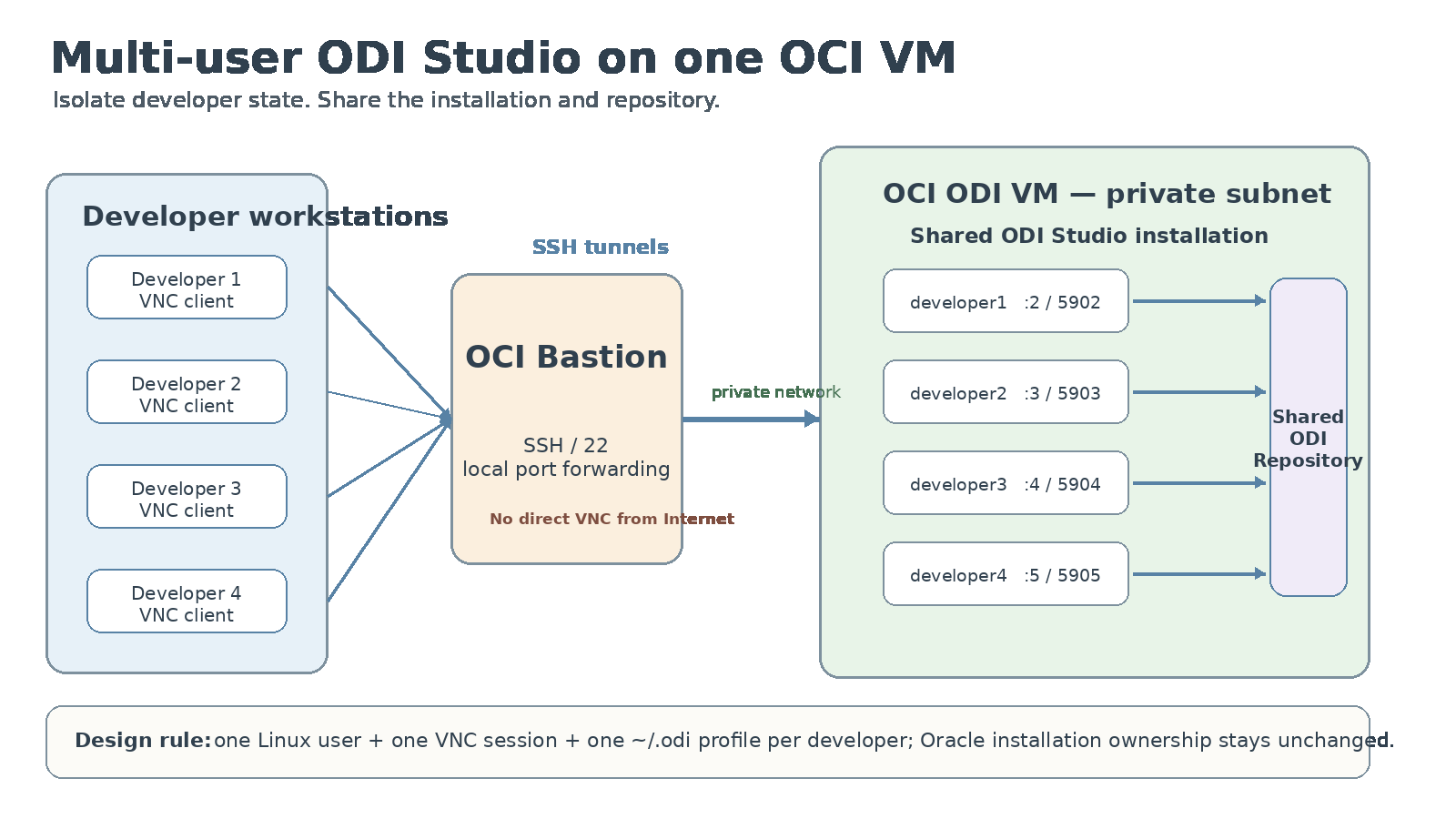
The access path is:
FLOW
Developer PC
    ↓
SSH local tunnel
    ↓
OCI Bastion
    ↓
ODI VM private interface
    ↓
developer-specific VNC session
    ↓
developer-specific Linux user
    ↓
developer-specific ODI Studio process
    ↓
shared ODI Repository
The architecture deliberately keeps the Oracle software installation shared while moving user-specific state into separate Linux home directories.
1. Give every developer a Linux identity
The first boundary is the Linux account.
Each developer gets a normal home directory instead of reusing the oracle account.
LINUX
useradd -m -s /bin/bash developer1
useradd -m -s /bin/bash developer2
useradd -m -s /bin/bash developer3
The ODI Middleware Home remains owned by the Oracle software owner. Developers receive the required execute access through the existing Oracle group rather than by changing ownership of the installation.
ACCESS
usermod -aG oracle developer1
usermod -aG oracle developer2
usermod -aG oracle developer3
This is a small decision with an important consequence: the multi-user design does not turn the Oracle software home into a user-managed directory.
The shared installation stays shared and controlled.
2. Map one VNC display to one Linux user
TigerVNC on Oracle Linux 8 uses /etc/tigervnc/vncserver.users for the user-to-display mapping.
The existing Oracle session on :1 can stay untouched while developer sessions are added next to it.
CONFIG
# /etc/tigervnc/vncserver.users

:1=oracle
:2=developer1
:3=developer2
:4=developer3
:5=developer4
The mapping is easy to reason about:
| Linux user | VNC display | TCP port |
|---|---|---|
oracle |
:1 |
5901 |
developer1 |
:2 |
5902 |
developer2 |
:3 |
5903 |
developer3 |
:4 |
5904 |
developer4 |
:5 |
5905 |
The developer sessions are then managed as normal systemd services.
SYSTEMD
systemctl enable --now vncserver@:2.service
systemctl enable --now vncserver@:3.service
systemctl enable --now vncserver@:4.service
systemctl enable --now vncserver@:5.service
One operational detail is easy to miss: when global TigerVNC settings change, already-running sessions keep their old configuration until they are restarted.
During the implementation, one display was already using the new private bind address while other displays were still listening on localhost. Restarting each affected VNC service applied the new setting.
3. Bind the desktop service to the private OCI interface
The VNC desktops should not become directly reachable from a developer workstation over the Internet.
The VNC configuration was therefore bound to the ODI VM private interface.
CONFIG
# /etc/tigervnc/vncserver-config-defaults

session=gnome
geometry=1920x1080
interface=<ODI_PRIVATE_IP>
After changing the bind address, restart the sessions that should pick it up:
SYSTEMD
systemctl restart vncserver@:2.service
systemctl restart vncserver@:3.service
And verify the listeners:
CHECK
ss -lntp | grep 590
The important point is not the exact address. The design rule is that the VNC listener belongs on the private OCI side of the architecture.
Firewall rules and OCI NSG/Security List rules should then restrict VNC traffic to the Bastion/private network path required by the design.
4. Use the Bastion as the access boundary
From the developer PC, the user creates an SSH local port forward through the OCI Bastion.
For a developer using VNC display :3 / port 5903:
SSH
ssh -i <BASTION_KEY> \
    -L 5903:<ODI_PRIVATE_IP>:5903 \
    opc@<BASTION_PUBLIC_IP>
The VNC client then connects to:
VNC
localhost:5903
The developer does not point the desktop client directly at the ODI VM private address.
That distinction keeps the user workflow simple while preserving the network boundary:
VNC client → localhost
              ↓
          SSH tunnel
              ↓
          OCI Bastion
              ↓
      OCI private network
              ↓
       ODI VM VNC session
5. The real isolation boundary is ~/.odi
Separate VNC desktops are useful, but they are not the most important part of the architecture.
ODI Studio stores user-specific configuration below the Linux user’s home directory. That makes the home directory—and especially ~/.odi—the real configuration boundary.
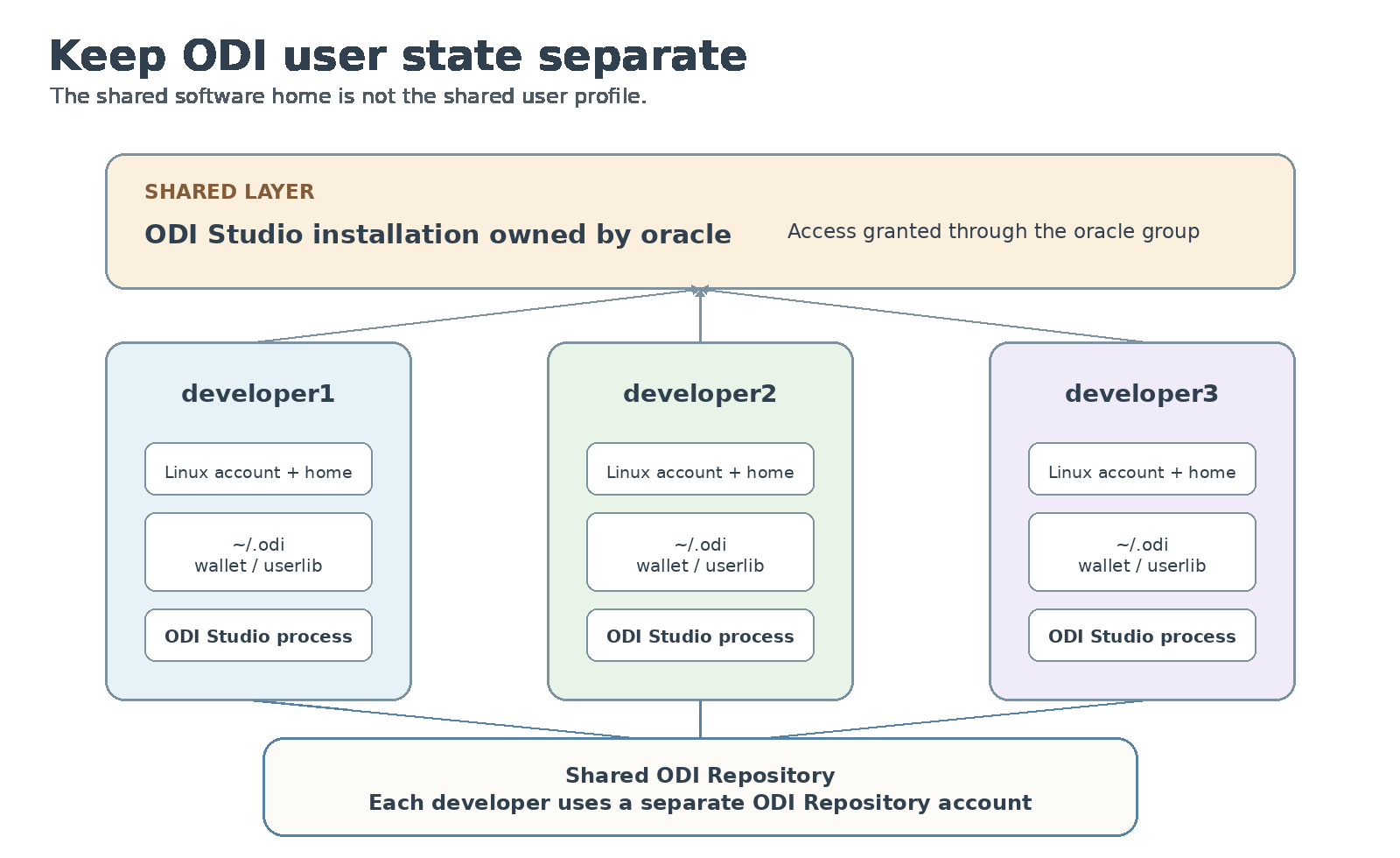
Each developer should have an independent ODI profile:
PROFILE
/home/developer1/.odi
/home/developer2/.odi
/home/developer3/.odi
If a user needs a wallet, place it in that user’s ODI profile and keep permissions local to the account.
WALLET
mkdir -p /home/developer1/.odi/oracledi/ewallet

cp -a /u01/oracle/mwh/wallets/. \
      /home/developer1/.odi/oracledi/ewallet/

chown -R developer1:developer1 /home/developer1/.odi
chmod -R go-rwx /home/developer1/.odi/oracledi/ewallet
The same principle applies to additional JDBC drivers: copy only what is needed into the user’s own ~/.odi/oracledi/userlib.
Do not solve the multi-user problem by copying the complete Oracle user’s .odi profile to every developer.
That creates exactly the configuration coupling the architecture is trying to remove.
There is another useful separation to keep explicit:
Linux/VNC identities and ODI Repository identities are different security identities.
A developer can own a Linux session without sharing an ODI Repository login. Each person should still use their own repository credentials.
6. Keep the ODI installation shared
ODI Studio itself does not need to be installed once per developer.
In the implementation, developers executed the same shared ODI Studio binary from the Oracle Middleware Home.
ODI
cd /u01/oracle/mwh/odi/studio
./odi.sh
The separation happens through the Linux user context:
same executable
     +
different $HOME
     =
different ODI user configuration
This is the core reason the approach remains maintainable. Patching and upgrading ODI still happens once, while user-specific preferences and runtime state remain separate.
A desktop launcher issue also surfaced during the setup: the installed desktop shortcut called a different launcher path than the command that was verified manually. The manual odi.sh start worked; the launcher correction was prepared but should be verified separately after modification.
That is a useful reminder to keep desktop convenience separate from architecture correctness.
What did not scale
Three patterns were deliberately avoided.
First, X11 forwarding for every developer. It is useful for occasional graphical administration, but it became slow and awkward as the normal ODI Studio access method for several users.
Second, sharing the oracle Linux account. That mixes shell history, desktop state, .odi configuration, wallets, libraries, and application preferences.
Third, changing ownership of the Oracle installation to make access easier. The safer model is to leave the software home with the Oracle owner and grant only the access developers need.
Verification checklist
A multi-user desktop is only useful if it survives the boring operational checks.
CHECK
# service status
systemctl status vncserver@:2.service --no-pager

# listening addresses and ports
ss -lntp | grep 590

# user access to ODI Studio
sudo -iu developer1 \
  test -x /u01/oracle/mwh/odi/studio/odi.sh \
  && echo "ODI access OK"

# verify user identity
id developer1
I also verify the following after configuration changes:
- every VNC display maps to the intended Linux user;
- every restarted session listens on the intended private interface;
- the developer can start ODI Studio from their own account;
- the developer has their own
~/.odi; - wallets and additional drivers are not accidentally shared;
- VNC is reachable only through the intended Bastion/private-network path.
Security is part of the architecture, not a cleanup task
During implementation, opening an individual VNC port in firewalld was useful for testing. That should not become the final security model by accident.
The intended end state is:
SECURITY
Internet
   ↓
OCI Bastion / SSH
   ↓
private OCI network
   ↓
ODI VM private interface
   ↓
developer-specific VNC port
VNC ports should be limited to the required Bastion/private subnet path in both the host firewall and OCI network controls.
The public article intentionally uses placeholders rather than internal IP addresses, Bastion addresses, usernames, or environment-specific credentials.
The result
The final architecture is deliberately uneventful:
- one OCI ODI VM;
- one Oracle-owned ODI installation;
- one shared ODI Repository;
- several Linux users;
- one VNC desktop per developer;
- one ODI Studio process and profile per developer;
- access through OCI Bastion and SSH tunnels.
That is exactly why it works.
There is no need to duplicate the Middleware Home, no reason to let developers overwrite each other’s configuration, and no need to turn a server-side Oracle installation into a collection of individually maintained copies.
The architectural change is small, but it moves the right boundary.
Share the infrastructure. Isolate the developer state.
For ODI Studio on a shared OCI VM, that distinction is what turns a single-user-style desktop into a practical multi-user development environment.